Passing props
src/App.js - Class Component
import React, { Component } from 'react';
import Child from './Child';

class App extends Component {
  render() {
    return (
      <div className="App">
        <Child onShowingHello="Hello" />
      </div>
    );
  }
}

export default App;
src/Child.js - Functional Component
import React from 'react';

const Child = props => (
  <div>
    <div>I'm receiving... {props.onShowingHello}</div>
  </div>
);

export default Child;
If you go to http://localhost:3000/ you will see: I'm receiving... Hello
Passing an array and Each child in an array or iterator should have a unique "key" prop. warning.
Imagine that rather than passing a string we pass an array and we loop it with .map() on our child component
Probably, you would do something like…
src/App.js
import React, { Component } from 'react';

const Child = props => (
  <div>
    <div>
      I'm receiving...{' '}
      {props.onShowingHello.map(eachGreeting => <li>{eachGreeting}</li>)}
    </div>
  </div>
);

class App extends Component {
  render() {
    return (
      <div className="App">
        <Child onShowingHello={['Hi', 'Hello', 'Hola', 'Hi']} />
      </div>
    );
  }
}

export default App;
… and it works, however, if you check your dev console you will see the following warning…
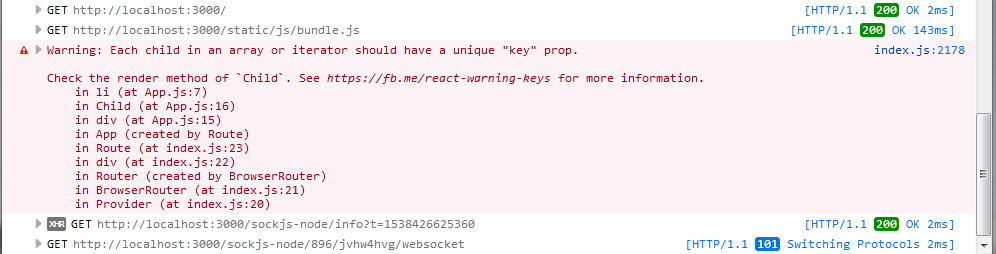
What’s going on…? When we are looping an array, each child (no matter the element) must have a UNIQUE key property which will allow React to preserve the Component>DOM relation used in the reconciliation process, letting React know which element changed. Having a key is a stable way of referring to x-element (see it as your Passport ID).
We can “fix” this adding a key to the element. For our example, we are going to use the item index since we don’t have other “stable value” (I don’t recommend using it in a real project).
If we try to use the own element/item, like “Hi”, and, if our array has the element twice: ['Hi', 'Hello', 'Hola', 'Hi'] we will end with a similar warning but now referring to “key duplication”.
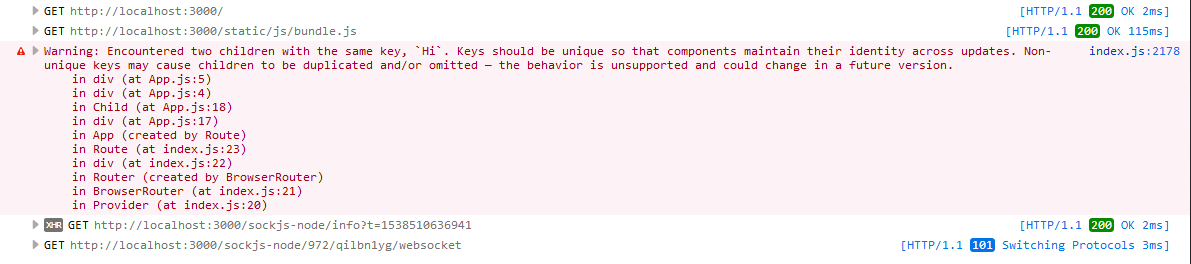
However, you should remember that index is -still- potentially dangerous and it can produce “unexpected side effects”.
Note: We use htmlFor instead of for.
import React, { Component } from 'react';

const Child = props => (
  <div>
    <div>I'm receiving...</div>
    <ul>
      {props.onShowingHello.map((eachGreeting, index) => (
        <li key={index}>
          <input
            type="checkbox"
            id={eachGreeting}
            name={eachGreeting}
            value={eachGreeting}
          />
          <label htmlFor={eachGreeting}>{eachGreeting}</label>
        </li>
      ))}
    </ul>
  </div>
);

class App extends Component {
  state = {
    ourSalutation: ['Hi', 'Hello', 'Hola']
  };
  render() {
    return (
      <div className="App">
        <Child onShowingHello={this.state.ourSalutation} />
        <button
          onClick={() =>
            this.setState({
              ourSalutation: ['be', ...this.state.ourSalutation]
            })
          }>
          Add
        </button>
      </div>
    );
  }
}

export default App;
If we run our App we will see a plain (extremely flat) list of checkboxes with no errors or warnings in our dev console. Next to each checkbox, the proper element with its index.
Do the following…
- Check “Hola” (the last element) which has index 2
- Click on Add
- Revise the list Yes… Now “Hello” is checked. It changed its index from 1 to 2 and “Hola” is on index 3.
Does it make sense now…? React still thinks that the key attribute with value 2 is “tied” to “Hola”.
How should we fix the issue in a PROD env…?
First, in our case, change the hard-coded value of the local state property ourSalutation
Before:
state = {
  ourSalutation: ['Hi', 'Hello', 'Hola']
};
After:
state = {
  ourSalutation: [
    { salutation: 'Hi', timestamp: '29519bf2-c68e-11e8-8f1c-f3e5f253a17f' },
    {
      salutation: 'Hello',
      timestamp: '3c72eae1-c68e-11e8-a508-89da3bf216bc'
    },
    { salutation: 'Hola', timestamp: '46af7641-c68e-11e8-9146-8343393a23eb' }
  ]
};
Second, install the package uuid and use the version 1 (aka, timestamp). Then, change you onClick handler
Before:
<button
onClick={() =>
  this.setState({
    ourSalutation: ['be', ...this.state.ourSalutation]
  })
}>
After:
<button
  onClick={() =>
    this.setState({
      ourSalutation: [
        { salutation: 'be', timestamp: uuid.v1() },
        ...this.state.ourSalutation
      ]
    })
  }
>
Third, in your Child component destructure the object and use timestamp as value for the key.
Now, try again checking x-checkbox and clicking on Add.
I’m attaching the entire example with all the needed code in the folder: examples/basic-react-example[map-with-key]
Remember: each key should be unique and static in the context of x-array. This means that if we have 2 different arrays that we are mapping, we can have same key values since these “IDs” are referring to elements of different array (just a shared addresses but on different States).
Let’s say that we want to pass down a state property of App.js to Child.js as props.
src/App.js
import React, { Component } from 'react';
import Child from './Child';

class App extends Component {
  state = {
    message: 'Hello'
  };
  render() {
    return (
      <div className="App">
        <Child onShowingHello={this.state.message} />
      </div>
    );
  }
}

export default App;
src/Child.js
If we are using a Functional Component we will access to props through props, for example, props.onPassingMessage
If we are using a Class Component, through this.props.onPassingMessage
Dynamic values passed as props and rendering
In the previous examples we were hard-coding the value of message…
state = {
  message: 'Hello'
};
However, in practice, usually our data is going to be dynamic. Think of an input where the user introduces some value (for example message) which is going to be passed down as prop. We would start with an empty string (message: ''), then a Controlled Form would update the value of the state property (message: 'Hola') what would result in… I'm receiving... Hola
But, until your parent Component pass “something” down, different than the default empty string, the Child one will render: I'm receiving...
Not a great user experience… I’m rendering… Nothing…?
We can fix this replacing…
...
<div>I'm receiving... {props.onShowingHello}</div>
...
With this…
...
{onShowingHello !== '' ? `I'm receiving... ${onShowingHello}` : null}
...
Now, we are only going to display our message if it’s different than the default one (empty string).
Going from the data to the UI
One of the most common cases is…
-
You have a RESTful API retrieving JSON. Example: https://jsonplaceholder.typicode.com/users You can check APIs documentation: https://github.com/typicode/jsonplaceholder#how-to
-
You defined (or at least know) the data set. Example: An array of objects (https://jsonplaceholder.typicode.com/users)
-
You know where are you going to hold the data. Example:
local state. -
You know how are you going to display or show the data (and local state related views if they are needed). Example: We are going to show all the users including (in our render) just
usernameandemail. -
You know related functionality. Example: We are going to sort by id DESC (you also know if you are going to use third-party functionality; in this case, the
sort-bypackage); so from 10 to 1.
Example:
First, remember to install sort-by - npm i sort-by
import React, { Component } from 'react';
import sortBy from 'sort-by';

const api = 'https://jsonplaceholder.typicode.com';

class App extends Component {
  state = {
    users: []
  };

  componentDidMount() {
    fetch(`${api}/users`)
      .then(res => res.json())
      .then(users => {
        this.setState({ users });
      });
  }

  renderUsers = () => {
    // Important: copy the array before sorting. `Array.prototype.sort()` sorts
    // in place, and mutating `this.state.users` directly would bypass `setState`
    // and break React's change detection.
    return [...this.state.users].sort(sortBy('-id')).map(user => {
      return (
        <li key={user.id}>{`Username: ${user.username}
        Email: ${user.email}`}</li>
      );
    });
  };

  render() {
    return <ul>{this.renderUsers()}</ul>;
  }
}

export default App;
At the moment, we have just one big and tied Component. However, we could split this Component into Sub-Components where each one cares just about one thing. We could decompose our previous example in something like (avoid being extremely granular)
App: the whole - Purpose: renders our main component (UserList).
UserList- Purpose: implements the logic to request and handle the API response (which includes rendering our User Component).User- Purpose: JSX to show on screen.
import React, { Component } from 'react';
import sortBy from 'sort-by';

const api = 'https://jsonplaceholder.typicode.com';

let User = ({ id, email }) => {
  return <div>{email}</div>;
};

class UserList extends Component {
  state = {
    users: []
  };

  componentDidMount() {
    fetch(`${api}/users`)
      .then(res => res.json())
      .then(users => {
        this.setState({ users });
      });
  }

  renderUsers = () => {
    return this.state.users.map(user => {
      return <User email={user.email} key={user.id} />;
    });
  };
  render() {
    return <div>{this.renderUsers()}</div>;
  }
}

class App extends Component {
  render() {
    return (
      <div>
        <UserList />
      </div>
    );
  }
}

export default App;
Of course, you can move each component to a new file and make the proper imports to allow re-usability.
Props and document.title
If you go to your public (or dist) folder, the one where you have the boilerplate index.html, you will see that CRA set a “static title” for your App: <title>React App</title>. With one screen (in this case the root one) you could replace and set the title there without bigger issues; however, as your application starts to scale (or grow) a pre-hardcoded title will not always satisfy your needs.
Later, we will try a more complex way of dealing with HTML header's tags, but for the moment, we can add some code to our componentDidMount() lifecycle method utilizing as well, the componentDidUpdate().
We have a list of users where we are rendering just emails; so, we can set a title like: E-mail list: x results where x is a dynamic number.
One more thing… Even when we did not see (yet) the Local State lesson, we are going to double the bet and not only use the setState() async method but also take advantage of its second parameter or argument: a callback or a function to execute once the state property is updated.
Note (modern React): The setState callback is still supported in class components, but for new code the React docs recommend reacting to a state change in componentDidUpdate (class components) or useEffect (function components / hooks) instead. Both run after the DOM has been updated and are easier to reason about.
componentDidMount() {
  fetch(`${api}/users`)
    .then(res => res.json())
    .then(users => {
      this.setState({ users }, () => {
        document.title = `E-mail list: ${this.state.users.length} results`;
      });
    });
}
Open your Web Developer Console, inspect the DOM and… Yes… You will see the proper title.
<title>E-mail list: 10 results</title>
Now, imagine that we have the ability to remove some of the emails of our list or, a programmatic function calling our API which could retrieve less | more objects (aka, emails).
That’s why we will also use componentDidUpdate() which will not render the first time or first render (where we are using componentDidMount()) but, every other time our component re-renders.
componentDidUpdate(prevProps, prevState, snapshot) {
  if (prevState.users !== this.state.users) {
    document.title = `E-mail list: ${this.state.users.length} results`;
  }
}
We use a conditional to be sure that, if other state property is updated or props are received, we will not change the title of our document, or what’s worse when we are working with sync/async methods and timers… End in a loop-hole. Our code will only be executed if a change on a particular property state, users, happens.