Redux
In Redux there’s a single Source of Truth: the store. The state is read-only (immutable); components cannot write directly into the state. Reducers create and return a new copy of the state.
When to use Redux…
- Shared state through multiple Components. Let’s say that we have ComponentA with one child, ComponentB. We can easily pass data down with props. But, if we need to pass the data across several components (example of “prop threading”: from A->B->-C->D) we should consider the global state or Redux store so we can instruct (without nesting) which components will have access to that data.
- Caching: when we want to cache API requests/responses.
For other cases, we should opt for Local State.
Pure functions
We make changes in the state through pure functions.
What are Pure Functions…?
- They depend just in the arguments that we pass.
- Same arguments should return same results (this makes pure functions easy to test).
- They don’t produce side effects (aka, NO interaction between the function and its outside scope. Example: HTTP calls)
One common example of pure and impure functions…
Pure function: slice()
let numbers = [1, 2, 3, 4, 5, 6];
numbers.slice(3, 5);
// Array [ 4, 5 ]

console.log(numbers);
// Array [1,2,3,4,5,6];
Impure function: splice()
let numbers = [1, 2, 3, 4, 5, 6];
numbers.splice(3, 5);
// Array [ 4, 5, 6 ]

console.log(numbers);
// Array [ 1, 2, 3 ];
Actions, Reducers and the store
To create the store we need at least one reducer which will receive all the actions (dispatched by the store) and return a new state of the application.
Actions
They are JS objects that describes an event that should update the application state. A Redux action must include the type property and, optionally, a payload (only send the necessary data).
{
  type: 'ADD_TO_TOTAL',
  amount: 10
}
Actions can be created (and returned) through Action Creators; these functions make the Actions portable and easy to test.
Also, for the value of the type property we should opt for CONSTANTS rather than strings (for practicality and to avoid errors related to typos).
const ADD_TO_TOTAL = 'ADD_TO_TOTAL';

const addToTotal = amount => ({
  type: ADD_TO_TOTAL,
  amount
});
Reducers
They are functions that receive 2 arguments: current state and the action that was dispatched. As we said before, they must be pure functions. They set the original state and return THEN the previous state or a new one.
Important: Please, read it carefully… Reducers must always return the state. We never modify (aka, mutate) the state directly. We create a new copy of the current state, modify the copy and return the copy (original state remains the same).
Every time that we talk about state in a Reducer, we are referring to the particular piece of state that the “concerned reducer” is responsible for.
Never mutate the state… Example: AVOID doing this
case ADD_TO_TOTAL:
  state.amount = action.amount;
  return state;
So… Our reducers will receive ALL actions. Inside the reducer (s) we switch the action by type and return the state for that match.
src/reducers/sumReducer.js
import { ADD_TO_TOTAL } from '../actions/types';

export default (state = 0, action) => {
  switch (action.type) {
    case ADD_TO_TOTAL:
      return state + action.amount;

    default:
      return state;
  }
};
Root reducer
createStore(reducer, [enhancer]) takes a single reducer, so… If we need to pass more than one, we should create a rootReducer, a reducer that utilizes composition (“combined reducers”) to call more than one reducer.
Example:
import { combineReducers } from 'redux';
import commentsReducer from './commentsReducer';
import postsReducer from './postsReducer';

const rootReducer = combineReducers({
  comments: commentsReducer,
  posts: postsReducer
});

export default rootReducer;
Note: combineReducers() will reduce the reducers to a single or main one, which will call every “child reducer” and set/handle each property of our state.
So for the previous reducers the shape of the store will be…
{
  comments: [],
  posts: []
}
createStore() receives as second argument an enhancer. We can provide our middlewares using applyMiddleware(); this method accepts multiple arguments (aka, middlewares)
Store
It holds the application state. It dispatches actions that will hit the reducers which will return the state.
We create the store through the method createStore(reducer)
import React from 'react';
import { BrowserRouter, Route } from 'react-router-dom';
import ReactDOM from 'react-dom';
import rootReducer from './reducers';
import { Provider } from 'react-redux';
import { createStore, compose } from 'redux';
import App from './App';

const composeEnhancers = window.__REDUX_DEVTOOLS_EXTENSION_COMPOSE__ || compose;

const store = createStore(rootReducer);

ReactDOM.render(
  <Provider store={store}>
    <BrowserRouter>
      <div>
        <Route exact path="/" component={App} />
      </div>
    </BrowserRouter>
  </Provider>,
  document.getElementById('root')
);
The Store has the following methods:
store.getState()> returns current state of the storestore.dispatch(action)> sends/dispatches the action to all the reducers to return a new property statestore.subscribe(callback)> will execute the callback when the state changesstore.replaceReducer(reducer)> will replace current reducer with the provided one
IMPORTANT: In Redux (as in React or programming in general) you don’t duplicate data. Remember that you have one Source of Truth: the Store. Also, put special attention to the shape of the Store… Try to keep it as simple and shallow as you can obviating complex nested structures.
App modularity or skeleton
Usually, the most common ways to organize our code is through:
- Types
- Features
Personally, for “regular projects” I opt for the following structure…
/src
  /actions
  /components/
    Header.js
    Footer.js
  /css
  /data
  /hoc
  images
  /pages/
    Homepage.js
    index.js
    HomeAdvice
  /reducers
  /store
So, for example, inside src/Homepage (main route) I have my index.js where I import reusable components that I store inside src/components, but also, those which are particular tied to the src/Homepage one like src/Homepage/HomeAdvice.
If you want to easily reuse your components in other projects, you should probably go with features. In this case, you will have everything that component needs inside it (aka, its folder).
/src/
  Menu.js
  actions.js
  index.js
  reducers.js
Sometimes (aka, generally) you are going to have deeply nested paths.
Let’s think in the following case.
We are working in our Homepage: /home/yourUser/yourProject/src/pages/Homepage/index.js and we want to include our Footer: /home/yourUser/yourProject/src/components/Footer/index.js
We would do something like…
import Footer from '../../components/Footer/index.js';
In big projects this can generate confusion. But, you have other option: use 'absolute paths' instead of 'relative'.
For this, we are going to create an environment file at the project root: .env (Create React App reads .env from the project root, not from src/).
NODE_PATH=src/
Note about .gitignore: a .env file commonly contains secrets (API keys, tokens, database URLs), so by default you should exclude it from version control. The recommended pattern is to commit a .env.example file with placeholder values and keep the real .env out of git. The file in our example does not contain secrets — it only sets NODE_PATH — so committing it is harmless, but get into the habit of excluding .env so secrets cannot leak by accident later.
Now, rather than using ../../components/Footer/index.js we will use ./components/Footer/index.js starting always from our src/
If we place our Components in different folders (let’s say that we move Homepage to /home/yourUser/yourProject/src/pages/main/Homepage/index.js) our import statements will not be affected.
react-redux
It allows us to dispatch actions and access to our Store from inside our components. For this, we use the Provider tag and the connect() method.
- Provider wraps our application taking the store as prop, setting the store context and passing it down to child components.
- With Connect we can dispatch actions and access specific parts of our state. It returns a
curried function.
...
connect(mapStateToProps, mapDispatchToProps)(App)
Note: Connected components (aka, Components using the connect() method) are also called Smart Components or Containers. Some people place them inside src/containers/.
Usually you connect the most parent Component that cares about a particular piece of state.
For example… If you have a “list of notes”, you will connect ListofNotes.js which is going to pass down as props the particular note to Note.js
mapStateToProps(state, [ownProps])
Define which data are we going to pass to the component. That data is going to be available through props.
Example:
import React, { Component } from 'react';
import { connect } from 'react-redux';
import * as actions from './actions';

class App extends Component {
  componentDidMount() {
    this.props.fetchComments();
  }
  render() {
    return (
      <div>{`Comment with id 1: ${JSON.stringify(
        this.props.comments[0]
      )}`}</div>
    );
  }
}

function mapStateToProps(state) {
  return {
    comments: state.comments
  };
}

export default connect(mapStateToProps, actions)(App);
Result:
Comment with id 1: {"postId":1,"id":1,"name":"id labore ex et quam laborum","email":"Eliseo@gardner.biz","body":"laudantium enim quasi est quidem magnam voluptate ipsam eos\ntempora quo necessitatibus\ndolor quam autem quasi\nreiciendis et nam sapiente accusantium"}
As you can see, we access through this.props (Class Component) or props (Functional Component).
Remember that you can destructure
Example for Functional Component
const App = ({ comments }) => (
  <div>{`Comment with id 1: ${JSON.stringify(comments[0])}`}</div>
);
Note: Once you load the page, for a fraction of seconds you will see
Comment with id 1: undefined; this is because we are dealing with an async operation (an operation that takes some time to resolve).
We can provide a better user experience showing a loading message.
Example:
{
  !this.props.comments[0]
    ? 'I am loading...'
    : `Comment with id 1: ${JSON.stringify(this.props.comments[0])}`;
}
Until this.props.comments[0] is something (or, is different than undefined), we show the 'I am loading...' message. It is not a must, but, it offers a better “contextual” interaction.
Whether we use export default connect(mapStateToProps, actions)(App); (actions object) or export default connect(mapStateToProps, mapDispatchToProps)(App); (mapDispatchToProps method), mapStateToProps must be something. If we don’t need access to the store, just to dispatch we should set it as null
Example: export default connect(null, actions)(App);
Alternatively, you can replace mapStateToProps with an anonymous function.
So this…
export default connect(mapStateToProps, actions)(App);
Now would be…
export default connect(
  state => {
    return { comments: state.comments };
  },
  { fetchComments }
)(App);
If you follow this approach, remember to remove mapStateToProps
mapDispatchToProps()
Allows us to bind dispatch() to our action creators before they hit the component.
What is currying…?
Currying is a transformation: a function that takes multiple arguments — f(a, b, c) — is rewritten as a chain of functions that each take exactly one argument: f(a)(b)(c). Each call returns a new function waiting for the next argument, and the final call returns the result.
It is closely related to, but not the same as, partial application. Partial application takes a function of N arguments and pre-fills some of them, returning a new function that takes the remaining ones — it does not require the underlying function to be one-argument-at-a-time.
In React-Redux, connect(mapStateToProps, mapDispatchToProps)(Component) is a curried function: the first call returns a new function, which we then call with the component.
Example:
add = a => {
  return b => {
    return a + b;
  };
};

console.log(add(1)(3));
// 4
We can simplify it to
add = a => b => a + b;

console.log(add(1)(3));
// 4
Example passing one value, storing and then passing the other
add = a => b => a + b;

const addition = add(1);
console.log(addition);
/*
 function (b) {
    return a + b;
  }
*/

console.log(addition(3));
//4
Note: In this example we have 2 functions (the outer a => ... and the inner b => ...); the outer call returns the inner function, which when called returns the value.
Now… Let’s install some libraries.
npm install axios react-redux redux-promise redux --save
Create the folder src/reducers and inside it the following files…
src/reducers/index.js
import { combineReducers } from 'redux';
import commentsReducer from './commentsReducer';
const rootReducer = combineReducers({
  comments: commentsReducer
});

export default rootReducer;
Now, we are going to write our first reducer.
src/reducers/commentsReducer.js
import { FETCH_COMMENTS } from '../actions/types';

export default (state = [], action) => {
  switch (action.type) {
    case FETCH_COMMENTS:
      return [...state, ...action.payload.data];

    default:
      return state;
  }
};
Create the folder src/actions and inside it the following files…
src/actions/types.js
export const FETCH_COMMENTS = 'FETCH_COMMENTS';
src/actions/index.js
import { FETCH_COMMENTS } from './types';

import axios from 'axios';

const api = 'https://jsonplaceholder.typicode.com/';

const headers = {
  Accept: 'application/json'
};

export function fetchComments() {
  const query = 'comments';
  const endPoint = `${api}${query}`;

  const request = axios.get(endPoint, { headers });
  return {
    type: FETCH_COMMENTS,
    payload: request
  };
}
Now we are going to wire up our store…
src/index.js
import React from 'react';
import { BrowserRouter, Route } from 'react-router-dom';
import ReactDOM from 'react-dom';
import rootReducer from './reducers';
import { Provider } from 'react-redux';
import { createStore, applyMiddleware, compose } from 'redux';
import ReduxPromise from 'redux-promise';
import App from './App';

const composeEnhancers = window.__REDUX_DEVTOOLS_EXTENSION_COMPOSE__ || compose;

const store = createStore(
  rootReducer,
  composeEnhancers(applyMiddleware(ReduxPromise))
);

ReactDOM.render(
  <Provider store={store}>
    <BrowserRouter>
      <div>
        <Route exact path="/" component={App} />
      </div>
    </BrowserRouter>
  </Provider>,
  document.getElementById('root')
);
And now, in our component (example, App)
import React, { Component } from 'react';

import { connect } from 'react-redux';
import { bindActionCreators } from 'redux';
import { fetchComments } from './actions';

const Child = () => {
  return <div>Im Child!</div>;
};

class App extends Component {
  state = {
    friend: '',
    friends: []
  };

  componentDidMount() {
    this.props.fetchComments();
  }

  updateStateProperty = (stateProperty, statePropertyValue) => {
    this.setState({ [stateProperty]: statePropertyValue });
  };

  submitHandler = e => {
    e.preventDefault();

    this.setState(previousState => {
      return {
        friends: [...previousState.friends, this.state.friend],
        friend: ''
      };
    });
  };

  render() {
    const { friend } = this.state;
    const { fetchComments } = this.props;
    return (
      <div>
        <h1 className="title">Add your friends!</h1>
        <form onSubmit={this.submitHandler}>
          <input
            type="text"
            name="friend"
            value={friend}
            onChange={event =>
              this.updateStateProperty(event.target.name, event.target.value)
            }
          />
          <button>Add friend!</button>
        </form>
        <Child />
      </div>
    );
  }
}

function mapStateToProps(state) {
  return {
    comments: state.comments
  };
}

function mapDispatchToProps(dispatch) {
  return bindActionCreators({ fetchComments }, dispatch);
}

export default connect(mapStateToProps, mapDispatchToProps)(App);
If we check our Redux DevTools console…
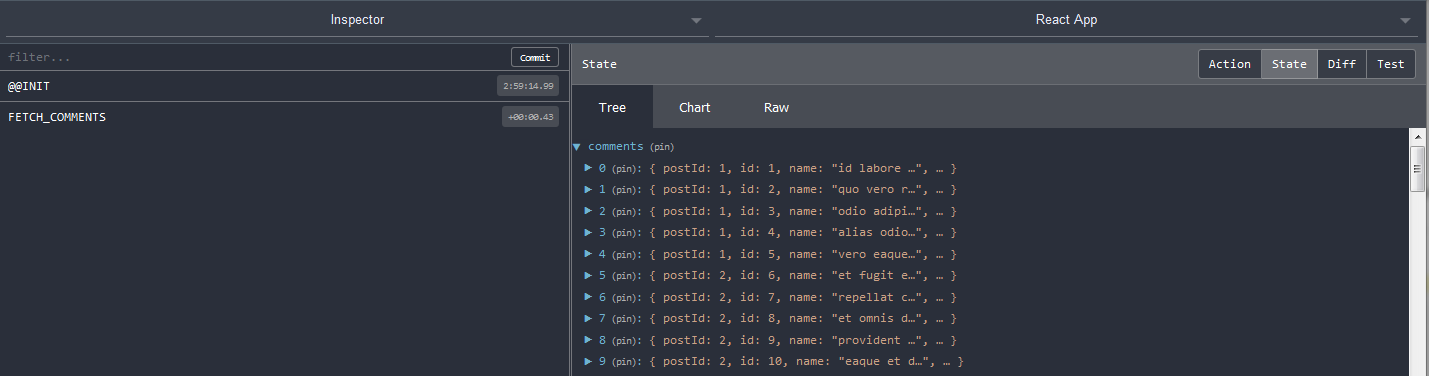
Note: remember that we can destructure or pull properties from objects. So…
function mapStateToProps(state) {
  return {
    comments: state.comments
  };
}
Can be replaced with…
function mapStateToProps({ comments }) {
  return {
    comments
  };
}
Since key and value are the same (comments) we can simplify it just to comments
… and, since we love ES6, we can use fat arrow function and return our object
const mapStateToProps = ({ comments }) => {
  return {
    comments
  };
};
Note: reducers immutability In our commentsReducer.js for the action.type “FETCH_COMMENTS” we are returning the previous state and appending the “new” payload.
You could be tempted to do something like: return action.payload.data instead. however, through an easy example I will show you why you should not.
In your commentsReducer.js change…
case FETCH_COMMENTS:
  return [...state, ...action.payload.data];
with…
case FETCH_COMMENTS:
  return action.payload.data;
Go to http://localhost:3000/
You will see the list of comments.
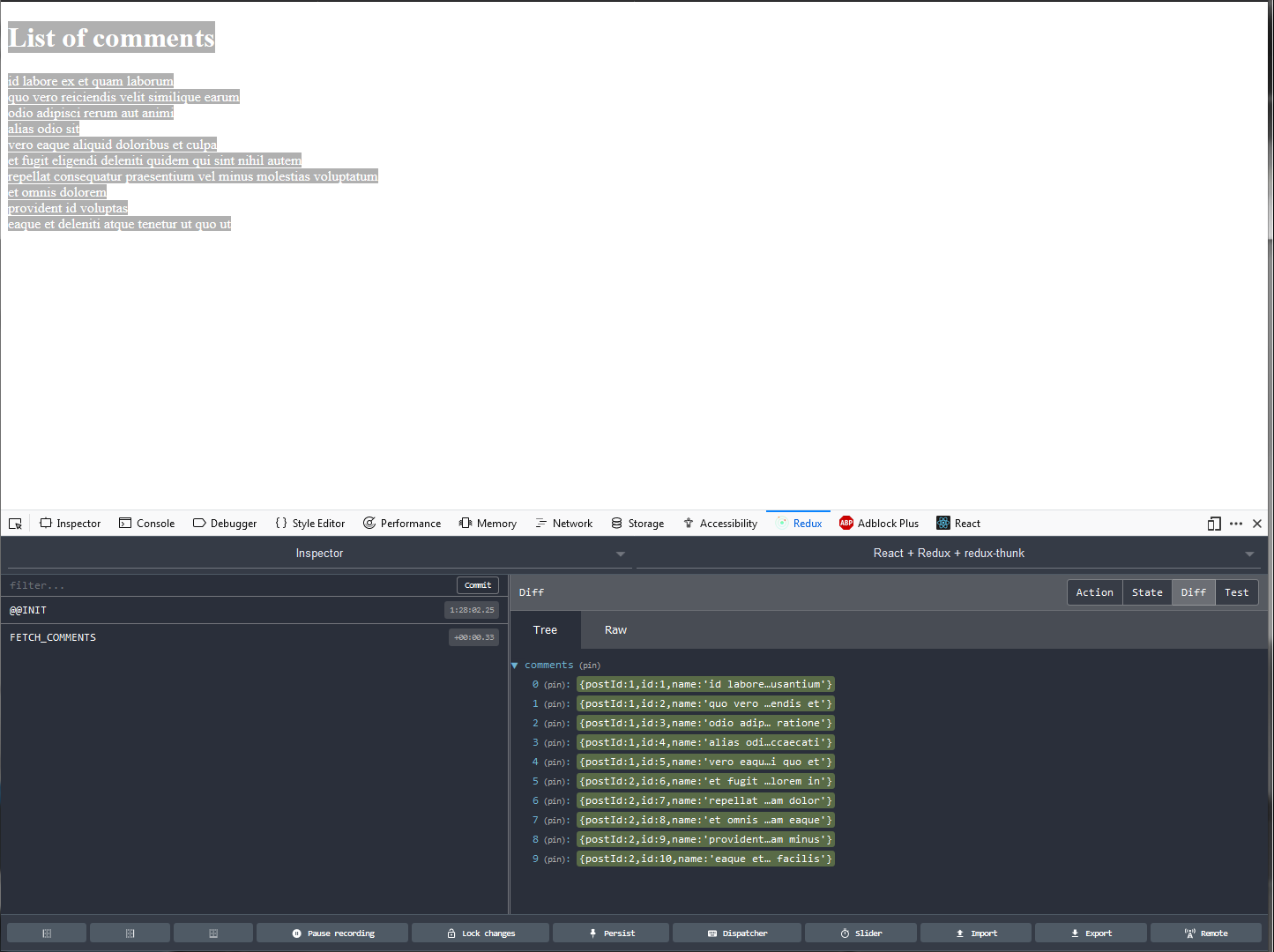
Now, open your Dev console; go to the Redux tab and click on Dispatcher.
Copy and paste the following Action…
{
type: 'FETCH_COMMENTS',
payload: {
  data: [{
    postId: 1,
    id: 1,
    name: "TESTING",
    email: "Eliseo@gardner.biz",
    body: "laudantium enim quasi est quidem magnam voluptate ipsam eos\ntempora quo necessitatibus\ndolor quam autem quasi\nreiciendis et nam sapiente accusantium"
  }]}
}
… and click on Dispatch.
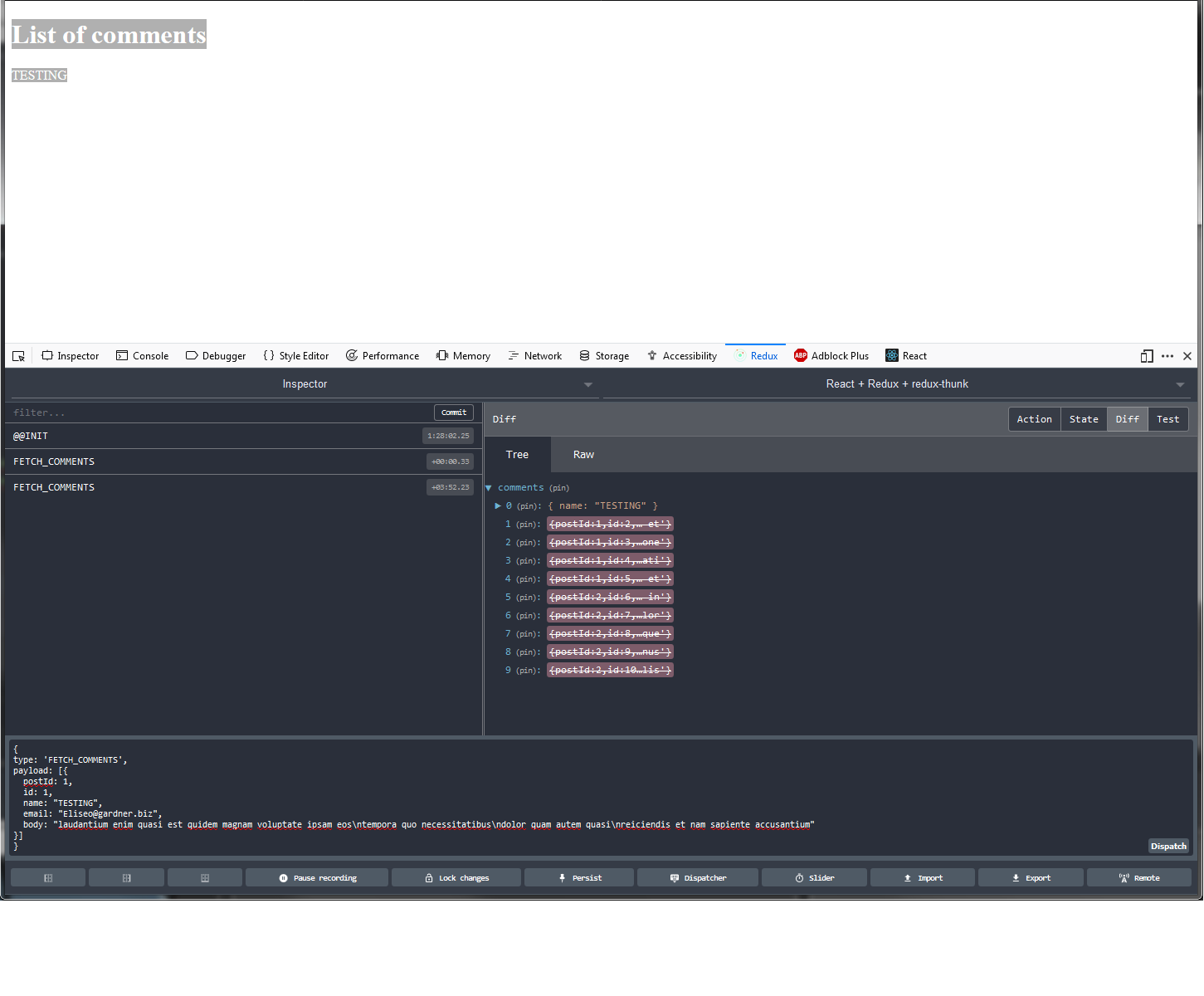
Dispatch as many times as you want. What is going on…? Every time you dispatch, you are “cleaning” the previous state and setting the payload as the new value of your state property, in our case, comments.
Now, in your commentsReducer.js replace your return with the original one:
case FETCH_COMMENTS:
  return [...state, ...action.payload.data];
Using the same Action, dispatch. You can see the difference. Now, you are preserving the previous state appending the new Object. The more you dispatch the action we have in our Redux Dispatcher, the more times you will see the property of that object on screen. I did it 3 times and this is what my component is rendering…
Note: the duplication you see when dispatching the same action repeatedly is intentional in this demo — we want to show that [...state, ...action.payload.data] appends rather than replaces. In a real reducer fetching the same list from an API you would normally replace the slice (return action.payload.data;) or normalize by id so that re-fetching produces the same shape.
List of comments
id labore ex et quam laborum
quo vero reiciendis velit similique earum
odio adipisci rerum aut animi
alias odio sit
vero eaque aliquid doloribus et culpa
et fugit eligendi deleniti quidem qui sint nihil autem
repellat consequatur praesentium vel minus molestias voluptatum
et omnis dolorem
provident id voluptas
eaque et deleniti atque tenetur ut quo ut
TESTING
TESTING
TESTING
Architectural advice…
Currently, our comments piece of state is an array of objects. This is “good enough” for this App, however, it doesn’t scale neither perform properly for big projects. You should always opt for objects with IDs as keys (aka, normalized state) instead of array.
Using lodash, we can take advantage of _.mapKeys(object, key). So, in our reducer first we will import import _ from "lodash"; and then, we will change…
Old:
case FETCH_COMMENTS:
  return action.payload.data;
New:
case FETCH_COMMENTS:
  return _.mapKeys(action.payload.data, 'id');
So… We will pass from this…
[
  {
    postId: 1,
    id: 1,
    name: 'id labore ex et quam laborum',
    email: 'Eliseo@gardner.biz',
    body:
      'laudantium enim quasi est quidem magnam voluptate ipsam eos\ntempora quo necessitatibus\ndolor quam autem quasi\nreiciendis et nam sapiente accusantium'
  },
  {
    postId: 1,
    id: 2,
    name: 'quo vero reiciendis velit similique earum',
    email: 'Jayne_Kuhic@sydney.com',
    body:
      'est natus enim nihil est dolore omnis voluptatem numquam\net omnis occaecati quod ullam at\nvoluptatem error expedita pariatur\nnihil sint nostrum voluptatem reiciendis et'
  }
];
To this…
{
    "1": {
        "postId": 1,
        "id": 1,
        "name": "id labore ex et quam laborum",
        "email": "Eliseo@gardner.biz",
        "body": "laudantium enim quasi est quidem magnam voluptate ipsam eos\ntempora quo necessitatibus\ndolor quam autem quasi\nreiciendis et nam sapiente accusantium"
    },
    "2": {
        "postId": 1,
        "id": 2,
        "name": "quo vero reiciendis velit similique earum",
        "email": "Jayne_Kuhic@sydney.com",
        "body": "est natus enim nihil est dolore omnis voluptatem numquam\net omnis occaecati quod ullam at\nvoluptatem error expedita pariatur\nnihil sint nostrum voluptatem reiciendis et"
    }
}
Note: key is the property of the object that we want for our new object property. We could use name, email, etc… But, we opted for id since we need something unique.
At this point -probably- you are thinking… How will I map that object state…?
And here’s where we use lodash (or _) again.
Having the piece of state with a new shape we can use _.map(object)
So, for example, in our App.js we are going to include as first step. Next, we will create a method for render our comments and we will call that function from our JSX.
renderComments() {
  return _.map(this.props.comments, comment => {
    return <li key={comment.id}>{`Title: ${comment.name}`}</li>;
  });
}
And, as we said, inside our returned JSX…
{
  this.renderComments();
}
Example result:
Title: id labore ex et quam laborum
Title: quo vero reiciendis velit similique earum
Title: odio adipisci rerum aut animi
Title: alias odio sit
Title: vero eaque aliquid doloribus et culpa
Title: et fugit eligendi deleniti quidem qui sint nihil autem
Title: repellat consequatur praesentium vel minus molestias voluptatum
Title: et omnis dolorem
Title: provident id voluptas
...
...
...
Now, instead of dispatching in our Component we are going to resolve the promise and dispatch from our action creator using redux-thunk (we were using redux-promise to return an action with the payload property and a promise as value).
First, install redux-thunk:
npm install --save redux-thunk
Then, in src/index.js, swap the middleware. Note the new import — redux-thunk exports a default function, so we import it as reduxThunk.
import reduxThunk from 'redux-thunk';
// (you can keep the existing `import ReduxPromise from 'redux-promise';`
// commented out for now, or remove it entirely — we are no longer using it)

const store = createStore(
  rootReducer,
  //composeEnhancers(applyMiddleware(ReduxPromise))
  composeEnhancers(applyMiddleware(reduxThunk))
);
Go to src/actions/index.js
import { FETCH_COMMENTS } from './types';

import axios from 'axios';

const api = 'https://jsonplaceholder.typicode.com/';

const headers = {
  Accept: 'application/json'
};

export const fetchComments = () => dispatch => {
  const query = 'comments';
  const endPoint = `${api}${query}`;

  return axios.get(endPoint, { headers }).then(response => {
    dispatch({ type: FETCH_COMMENTS, payload: response.data });
  });
};
Now go to src/reducers/commentsReducer.js. With redux-promise the reducer was reading action.payload.data (because payload was the whole axios response). With the thunk above we are dispatching payload: response.data directly, so the reducer no longer needs the .data hop.
Change your current reducer body…
return _.mapKeys(action.payload.data, 'id');
… to:
return Object.assign({}, state, _.mapKeys(action.payload, 'id'));
(Object.assign({}, state, ...) merges the newly normalized batch into the existing state instead of replacing it; useful if you fetch more comments later without throwing away what you already have.)
Go to your component, example: src/App.js and…
Remove…
function mapDispatchToProps(dispatch) {
  return bindActionCreators({ fetchComments }, dispatch);
}
Replace…
export default connect(mapStateToProps, mapDispatchToProps)(App);
with…
export default connect(mapStateToProps, { fetchComments })(App);
Check your Redux DevTools. You should have the same results as previously.
Several times we referred to Middlewares… What is a Middleware…? Is Logic that intercepts a process (or request) producing a side effect. Middlewares can be chained. In Redux we use Middlewares to intercept dispatched actions modifying them (or not) before they hit the reducers. We can also dispatch other actions or execute some logic at the dispatching time or layer.
What is redux-thunk…? It’s a thunk middleware for Redux. We can use it for async HTTP requests (Redux only supports synchronous data flow) for example, when we are dealing/interacting with a server, delaying, dispatching, or dispatching if certain condition is met (like a response to our request).
With thunks we can return from the action creator a function instead of an object and intercept these actions before dispatching.